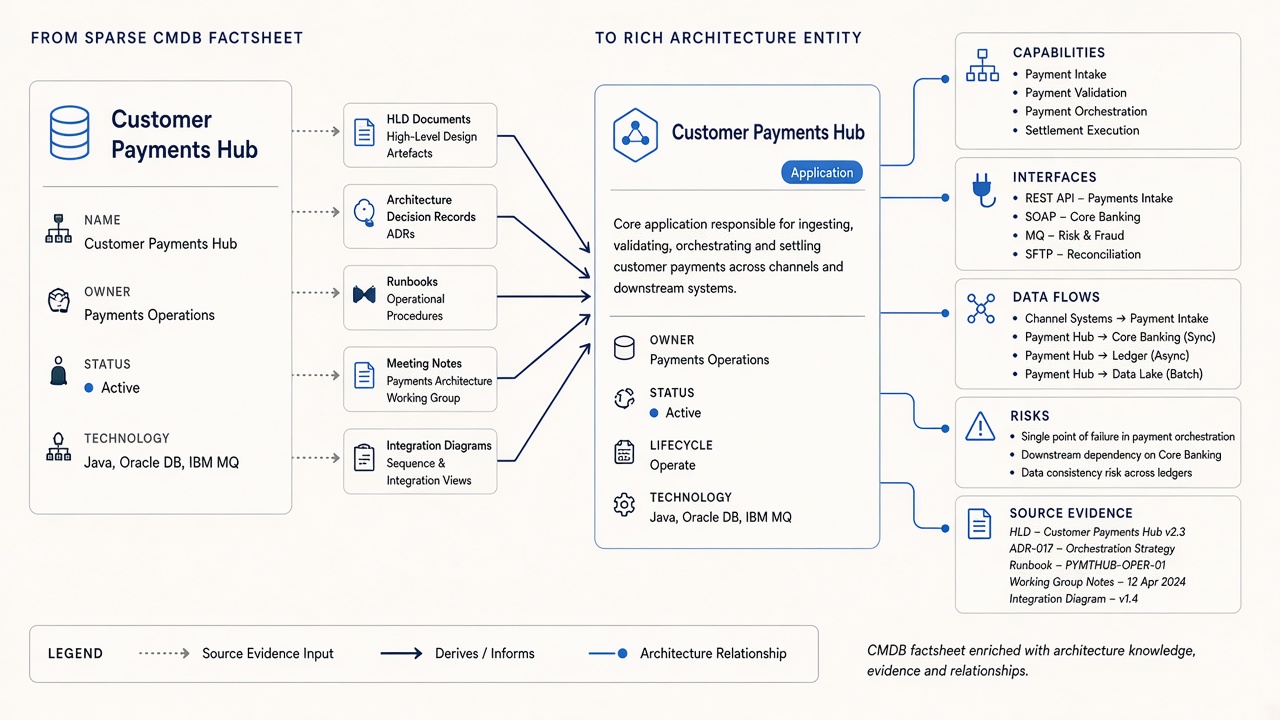
Your CMDB knows what exists. It rarely knows why it matters.
A CMDB-derived factsheet is a useful starting point. It can establish that a system exists, who owns it, whether it is active, where it runs and which technology it uses. Those are important operational facts.
But a decision-maker rarely asks only, “What is this application called?” They ask why it was introduced, which capability it supports, how information flows through it, what breaks if it changes, and which constraint prevents it from being retired. Those answers generally live in documents, diagrams and people — not in configuration-item fields.
This is the practical extension of why EA factsheets miss the How and Why: do not discard the structured factsheet; enrich it.
What a CMDB gives you — and what it leaves behind
Usually strong in a CMDB
- Canonical or semi-canonical system identity
- Application and technology names
- Business and technical ownership
- Lifecycle and operational status
- Environment, hosting and version information
- Criticality and support attributes
- Some infrastructure or application relationships
Usually trapped elsewhere
- Business purpose and capability contribution
- Why a design or vendor was selected
- Integration behaviour and data flows
- Manual workarounds and operational exceptions
- Undocumented dependencies
- Migration constraints and technical debt
- Historical decisions and rejected alternatives
- Regulatory or risk context
What should an enriched factsheet contain?
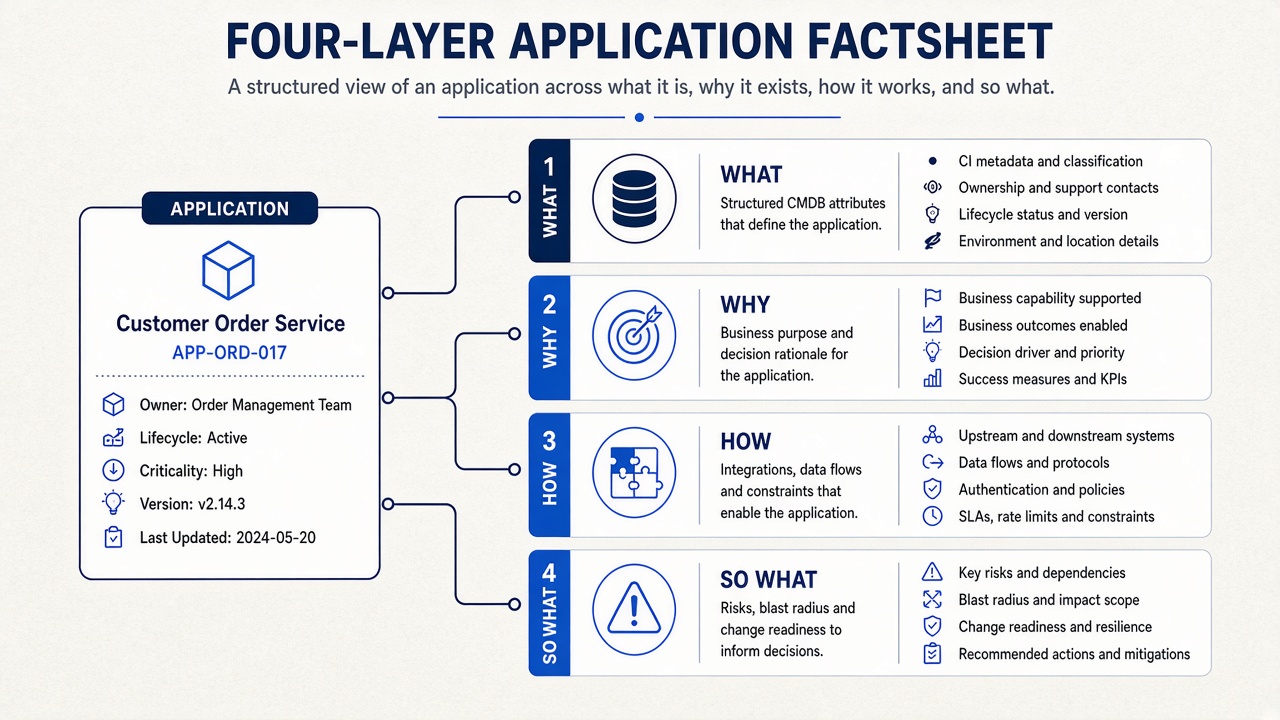
1. What
The structured identity inherited from the CMDB or inventory: name, type, owner, lifecycle, environment, technology and criticality.
2. Why
The business purpose, supported capabilities, decision drivers and rationale. This explains why the entity deserves to exist.
3. How
Integrations, information flows, protocols, operational behaviour, constraints and dependencies. This explains how the entity participates in the wider landscape.
4. So What
Blast radius, risk, change readiness, known debt, retirement barriers and recommended decisions. This is the layer leaders actually use.
A worked example: Customer Payments Hub
A CMDB record might say:
- Name: Customer Payments Hub
- Owner: Payments Operations
- Status: Active
- Criticality: Tier 1
- Technology: Java, Oracle, IBM MQ
After enrichment from an HLD, ADR, runbook and architecture workshop, the same entity can explain that it ingests, validates, orchestrates and settles customer payments; supports payment intake, validation, orchestration and settlement capabilities; exposes APIs to channel systems; uses MQ for risk and fraud integration; posts synchronously to core banking; and presents a data-consistency risk across ledgers.
The name did not change. Its decision value changed completely.
How to enrich EA factsheets: a practical workflow
Step 1: Seed the structured skeleton
Export a bounded CMDB or application inventory extract. In DecisionPen, import applications, technology components and similar catalogue items from a spreadsheet with guided column mapping. Establish canonical names and remove obvious duplicates.
A spreadsheet export is a transparent starting point: it establishes canonical identity before documents and experts add the How and Why.
Step 2: Attach evidence to the right entities
Add the HLDs, ADRs, interface specifications, runbooks, migration documents and transcripts that describe each application or domain. Matching should begin with the imported entity so the process enriches the existing record instead of manufacturing duplicates.
Step 3: Propose How and Why
Use AI to propose purpose, capability links, integrations, data flows, decisions, constraints, risks and missing relationships. Important claims should point back to the exact supporting source.
Step 4: Make conflicts visible
A document may describe a retired interface that still appears in the CMDB. A runbook may reveal a dependency absent from both. Do not let an algorithm silently choose the winner. Show provenance and date, mark uncertainty, and route the issue to an accountable curator.
Step 5: Curate, then ask
Architects and owners accept, edit, reject or defer proposed context. Once trusted, the enriched factsheets support Enterprise Ask: “What depends on this hub?”, “Why was MQ selected?”, “Which capabilities would be affected by replacing the ledger?” and “What evidence supports that answer?”
Step 6: Keep enriching incrementally
New designs, incidents, workshops and programme decisions should add context continuously. Enrichment is not a second one-off baseline project. It is part of incremental modelling.
Does this replace document-first modelling?
No. It gives teams a second on-ramp. If there is no trustworthy inventory, begin with automated IT landscape modelling from unstructured data. If a structured skeleton exists, enrich it. Most mature programmes will use both: the inventory identifies known entities, while documents reveal missing applications, richer relationships and the reasoning behind them.
How does DecisionPen solve this?
DecisionPen lets you import a structured catalogue from a spreadsheet, then bind documents, transcripts and expert narratives to the imported entities. Its metamodel-aware agent proposes enrichment and relationships; humans curate the proposals; and the evidence remains attached to the resulting living model.
That means a team does not have to choose between the credibility of a CMDB-derived inventory and the explanatory power of institutional memory. It can start with what it has and turn thin factsheets into a queryable Architecture Decision Workspace.
Start a trial with one inventory extract and the documents for a single application domain, or explore seeing and enriching the IT landscape.
When is DecisionPen not the right tool?
DecisionPen is not an operational CMDB or ServiceNow replacement. It is also not a Visio or BPMN drawing canvas. Use it when the goal is to enrich structured architecture entities with evidence and make better decisions from the combined model.