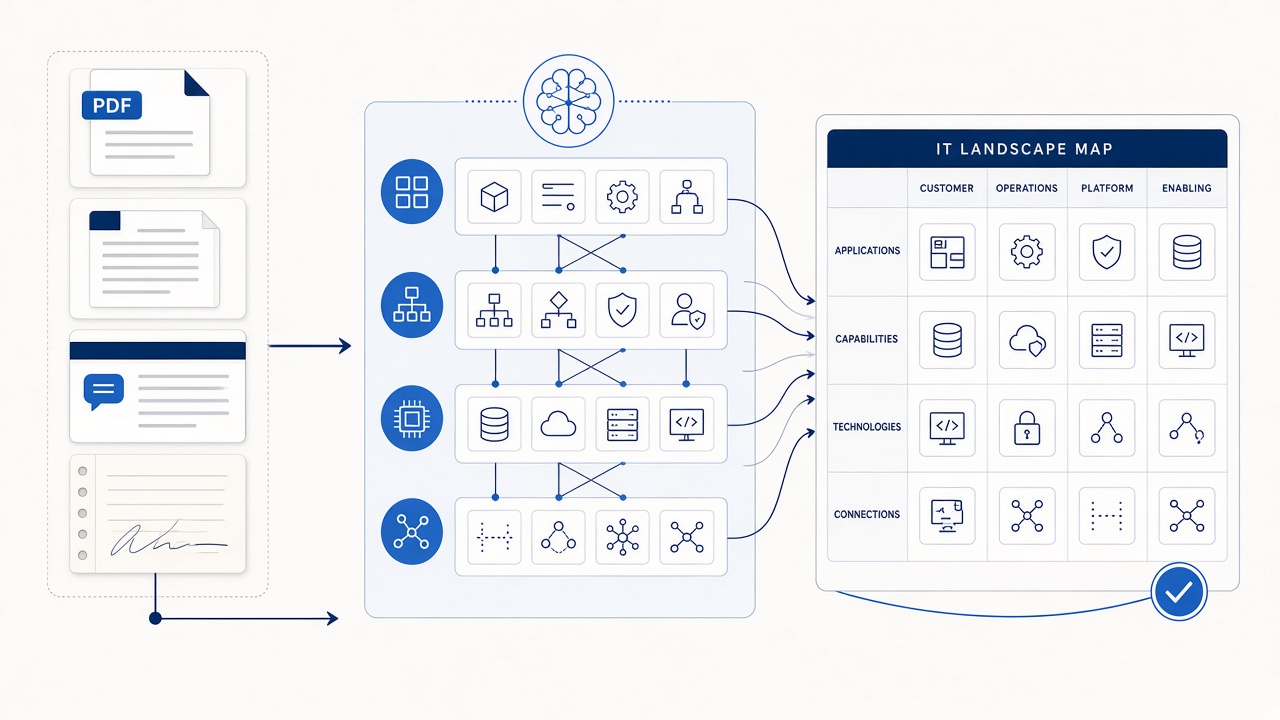
You build an application dependency map from existing documentation by having the documents describe the data flows and the modelling step interpret those flows as dependency interfaces: which application sends what to which, by what mechanism, and why. Proposed interfaces and relations are then curated into a map you can query. The documentation you already have becomes the source; no scanner has to be deployed first.
Why build dependency maps from documents rather than scanners?
Network and agent-based discovery tools are valuable for what is running, but they are rarely the fastest or most meaningful starting point for architecture decisions. They show connections without purpose, are often unavailable for a target or a regulated environment, and need access that takes weeks to arrange. Architecture documents, in contrast, already say what integrates with what, and — crucially — why.
Scanners and documents answer different questions. This post is about the second: using the knowledge your organisation has already written down. If you also run runtime tooling, treat its output as another evidence source rather than the foundation (see what is automated enterprise architecture discovery?).
Where do dependencies hide in existing documentation?
- Solution and high-level designs — context diagrams and integration sections naming upstream and downstream systems.
- Interface or integration registers — rows listing source, target, protocol, and frequency.
- Data-flow descriptions — “orders are published to the queue and consumed by fulfilment.”
- Runbooks and support notes — which systems must be restarted, in what order, and what breaks if one is down.
- Decision records and vendor documents — constraints such as a retiring API or a contractual dependency.
How do data flows become dependency interfaces?
A data flow in prose or a diagram is a claim about two applications. Interpreting it means identifying the endpoints, the direction, the information exchanged, and the mechanism, then expressing that as a typed interface and relations in the metamodel.
- Identify endpoints. Resolve names like “the CRM” or “billing engine” to canonical applications, merging aliases.
- Capture direction and content. Who produces, who consumes, and what business data moves.
- Record the mechanism. API, file transfer, message queue, database link — only when the evidence says so.
- Create the interface and relations. The interface becomes an entity of its own, related to both applications, so it can carry description, owner, and status.
- Bind the evidence. Link the interface to the passage that justified it, so reviewers and later questions can see the source.
What does automatic modelling of interfaces and relations add?
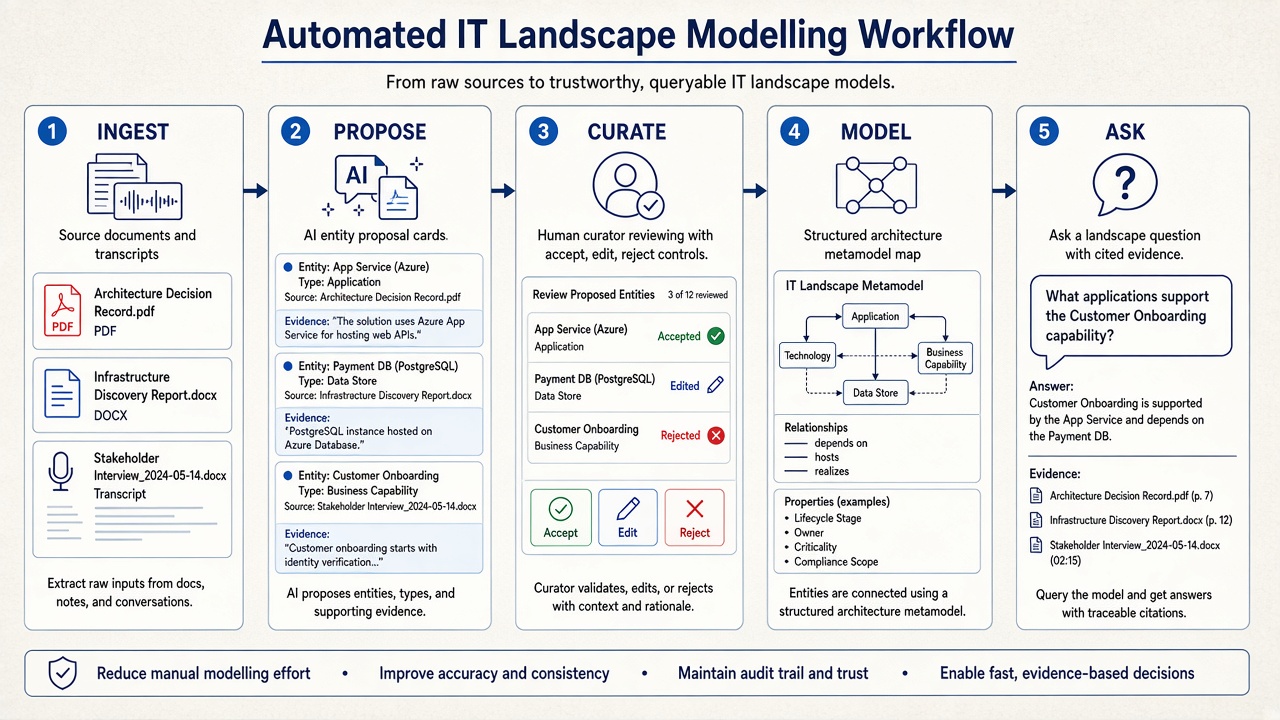
Doing the interpretation by hand across hundreds of documents is the part nobody finishes. Automatic modelling reads the documents, proposes applications, interfaces, and their relations, and ranks them by evidence strength. It also recommends relationships that only appear when documents are read together — a queue named in one design, its publisher in another — which is the cross-document effect described in keeping factsheets current with AI relation recommendations.
How do you curate and validate the dependency map?
- Start with critical applications. Review interfaces around the systems your decision touches before the long tail.
- Resolve contradictions. When two documents disagree about a flow, surface it as a review item rather than choosing silently.
- Mark gaps explicitly. An application with no known interfaces is a question to ask, not a sign it has none.
- Use human knowledge sparingly. Spend expert time on disputed or missing flows. The approach to review is detailed in how humans review and curate AI-proposed models.
What can you do with the map once it exists?
- Impact analysis — ask what depends on an application before retiring, migrating, or replacing it.
- Migration sequencing — group applications by shared dependencies so waves make sense.
- Integration diagrams — generate context and dependency views from the model rather than drawing them separately (see generating ADRs, blueprints, and diagrams).
- Agent reasoning — let agents traverse the graph for multi-hop questions with citations (how agents interrogate the map).
How does DecisionPen solve this?
DecisionPen is an Architecture Decision Workspace that models applications, interfaces, and relations directly from the documents you load, as part of incremental modelling.
- Data-flow interpretation turns described flows into typed interface entities and relations with evidence.
- Spreadsheet imports — an interface register or CMDB export loaded as a spreadsheet adds names and identifiers alongside the documents.
- Curation queues prioritise strongly evidenced and high-impact dependencies.
- Enterprise Ask answers dependency and blast-radius questions with citations (see Enterprise Ask).
- Diagrams from context — dependency views are produced from the curated model, not hand-drawn.
Trial DecisionPen on one critical application: load its design documents and interface list, and compare the proposed dependency map against what your team can recall.
When is DecisionPen not the right tool?
If you need to know what is actually communicating on the network right now, use runtime discovery or observability tooling; DecisionPen does not scan infrastructure or trace live traffic, and it does not synchronise with a CMDB (spreadsheet import only). If the documentation does not mention an integration, it cannot be modelled from it. And if you want a freehand drawing canvas, this is not a Visio replacement.
What to read next
- How do you turn unstructured data into an enterprise architecture model?
- Automating core IT landscape discovery and mapping
- Model EA from structured and unstructured sources with AI
- How do you fast-track M&A IT due diligence?
Series index (Conversion how-tos)
- D8a — Fast-track M&A IT due diligence
- D8b — This post (application dependency maps from documentation)
- D8c — Assess an IT landscape without months of workshops
- D8d — Keep the repository up to date with AI curation
- D8e — The incremental modelling flywheel